
en:jos_whatsnew
This is an old revision of the document!
JOS What's New
Release 5.0.5.20 (2026/08/19)
Minor Modification
- #45646 - Add display of sales order division to Payable Items(By Reservation) main directory
- #45980 - Add display of sales order owner to Shipping Document main directory
- #45987 - Add display of style long description to Quality Control main directory
- #46022 - Allow select color/size from material master when input material price table
- #46147 - 'Tranfer In' and 'Transfer Out' are merged into one transaction type, so Move Voucher main directory transaction type 'Transfer Out' changed to 'Transfer'
- #45409 - Standard inventory 'Daily Transaction Report', add selection of warehouse range to be outputted
Bugs Fixed
- #45668 - Duplicate operation orders are generated when create purchase order receipt. Already fixed.
- #45953 - Standard finished goods 'Receiving-Issuing-Stocking Report' total did not match with Move Voucher main directory summary footer total. Already fixed.
- #45455 - When add image from image master, system cannot show the selected image, but show 'The image has been deleted'. Already fixed.
- #46046 - When copy material price table record, not all color/size prices can be copied. Already fixed.
- #46061 - When create new inspection item record, system show 'duplicate record'. Already fixed.
- #46283 - If color card is not used, standard purchase order format cannot output material color. Already fixed.
Release 5.0.5.19 (2026/07/22)
Minor Modification
- #45365 - Enhance reports printing speed, solve 'Gateway timeout' error
- #45268 - Allow define material color and size in Material Master File
- #45474 - When lookup material color and size, allow select from material master
- #45529 - 'Issue Document(By Reservation) directory', add total for 'Reserved Quantity' in Summary Footer
- #45738 - (1) When copy BOM from sales order, system will compare BOM last modified date with material master last modified date. If material master last modified date if later than BOM last modified date, will update unit and factor from material master. If BOM unit are of different type from material master, unit consumption will reset to 0 (2) Because sample order and budget sheet BOM do not have 'Last Modified Date', so when copy BOM, option 'update unit and factor from master' is added
- #45931 - When lookup material master, download date is deleted. Avoid missing download some material codes and need to set the date for each material class
- #45446 - 'Purchase Order(By Item)' directory, add total for 'Charge' in Summary Footer
- #45427 - In Material Requirement Management directory, add 'Material Attributes' in download column
- #44489 - When click 'Recalc' in Material Requirment, system will show error message if purchase unit in BOm and material master are of different unit type and factor is not found
Bugs Fixed
- #45433 - Add output 'Trx Date' to Standard 'Payment Control' and 'Payment Control(Grid)' format. Also can select sort by 'Trx Date'.
- #45711 - When select lot no. from master in WMS 'Stock Take By lot No' transaction, error 'TiwSqlGridLink.FieldByName: FieldName: Color not find!' is found. Already fixed.
- #44895 - When preview purchasing order-'Purchase Receive Note', the transactions directory still shown on screen. Already fixed.
- #45858 - WMS operation order change barcode scanned quantity. Then confirm operation order and select 'Update Receive'. Error 'Access violation at address 00DBDD0B in module jos.exe' is found when change lot number reserved quantity. Already fixed.
- #45621 - System has no response when click BOM change logs in MRP module. Already fixed.
- #45220 - Cannot sort order milestone check-points date on directory. Already fixed.
Release 5.0.5.18 (2026/06/03)
Minor Modification
- #44881 - When create 'Shipment Out' transaction in Move Voucher, system will only show those cartons in ship out warehouse for selection
- #45369 - Allow batch edit for field 'Division' in Sample Order and Sales Order directories
- #45126 - Add 'Purchase Order (By Reservation with color & size)' standard model
- #45186 - Add 'Last Trx Date' download column to Sub=Contracting Order and Sub-Contracting Order (By Color) models. Showing the last received/returned transaction date
Bugs Fixed
- #45095 - When issue materials in Sub-contracting Order and Lot Management-Issue Note, 'Issue Quantity' show different value. Already fixed.
- #45310 - Under Simplified Chinese window, ’ETA Date’ column translation changed to ’交貨日期’
- #45337 - When copy sketch from other document in sub-contracting order, error ’tbwkSketch: Field ‘GraphicClass’ not found’ is found. Already fixed.
- #45353 - After preview purchase order delivery note, system will pop up 'Lot Information' screen. Already fixed.
- #45358 - After modify production instruction, context will change to garbage characters. Already fixed.
- #45395 - When create 'Production Receive' transaction in Move Voucher, error ’Cannot open file “”,檔案名稱、目錄名稱或磁碟區標籤語法錯誤’ is found when copy style information from sales order. Already fixed.
- #45407 - Thumbnail cannot show in Material Master directory. Already fixed.
- #45408 - When edit material master, error ’Cannot open file “”,檔案名稱、目錄名稱或磁碟區標籤語法錯誤’ is found. Already fixed.
- #45418 - Error 'Licence exceeded' is found even in logged in status. Already fixed.
- #45449 - Error 'Unknown image type' when save sketch to local in 'View'. Already fixed.
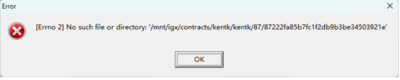
- #45447 - Below error is found when copy sample order. Already fixed.

Release 5.0.5.17 (2026/05/26)
- Remove the data record download limitation restriction.
- Unordered List ItemChange saving all images to files to increase UI performance.
- Various bug fixed.
- #44868 - Improve download/upload file/image feature (rtf attach is compressed)
- #44981 - Add download column 'Dye Lot' to Issue Note models
- #45304 - connection fail, cn1.igarment.net problem
- #45224 - add lookup feature for sample type
- #45081 - Color Sequence is not right in purchase receive form.
- #45155 - download report data from file server
- #45231 - material class sorting error
- #43848 - support parameter in lookup SQL of report form.
- #45110 - model/mr_manage.mdl, add sum of column outstanding.
- #44881 - Add packed qty and unpacked qty when select lot in finished goods
- #45086 - copy button disappear in BOM material
- #45022 - Select style error when open finished good
- #44800 - Buttons overlap when the window is narrowed; please implement a minimum width limit to ensure full column visibility.
Release 5.0.5.16 (2026/04/26)
- #43114 - Due to conflict with new coding method, save the 8 most recently selected items at top in dropdown menu has been cancelled
- #44300 - Cannot create new posted Accounting company. Already fixed.
- #44713 - Cannot see team sheet created by other users. Default use 'Level' in user group to determine 'Edit' or 'Ready Only' mode.,Already fixed.
- #44741 - 'Payable Items (By Reservation)' directory cannot show 'Alc Amt'. Already fixed.
- #44800 - When minimize Bill Of Material interface, the 'Ok' and 'Cancel' button will be overlapped. Already fixed.
- #44810 - When input style size in sales order, context will be cleared when press 'Enter'. Already fixed.
- #44844 - When use the 'Grading' function in BOM material size, the last character '0' will be cleared. Already fixed.
- #44848 - Importer/Exporter master 'Image' cannot show even after added. Already fixed.
- #44882 - Still can modify purchase order charges (by po and by items) even added to Payment Items. Already fixed. Need to remove Payment Items in order can be changed in purchase order.
- #44884 - Newly created color in color card cannot immediately shown on directory. Already fixed.
- #44891 - 'Purchase Order(By Color)' directory cannot shown 'Ship To Name' and 'Final To Name'. Already fixed.
- #44903 - Error 'SQl syntax' found in 'Exceptional Reservation' function in Material Requirement Management. Already fixed.
- #44922 - Wrong '(+%)' percentage found in Purchase Order Job Allocation. Already fixed.
- #44925 - Error “#45S22 Unknown column 'OrderNo' in 'field list'” found when paste image in Sample Order, Budget Sheet and Production Note. Already fixed.
- #44955 - 'Purchase Order (By Reservation)' directory shown all orders within selected criteria. Already fixed.
- #44967 - Below error found when open budget sheet. Already fixed.
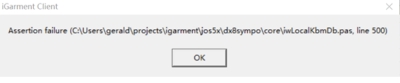
- #44984 - System running slow and hang, error ’Assertion failure (C:\Users\gerald\projects\igarment\jos5x\dx8sympo\core\iwServiceChannelRaw.pas, line 263)’ frequently occurred. Already fixed.
- #44995 - Error ’Could not convert variant of type (Null) into type (OleStr)’ found when open Bill of Material. Already fixed.
- #45008 - Error 'Duplicate entry …' found when insert multiple material sketches. Already fixed.



Release 5.0.5.15 (2026/04/16)
- #44825 - 'Input Helper' settings are lost after logout system. Already fixed.
- #44824 - Improve the response when switch to other interface after edit sketch description.
- #44819 - Auto logoff setting did not work. Already fixed.
- #44786 - When download records more than 10,000 in Material Requirement Management directory, the screen will turn black. Already fixed.
- #44780 - Error found when create new supplier code. Already fixed.
- #44764 - Error found when open two or more production note records, then click production instruction to edit. Already fixed.
- #44693 - System response is slow when switch between interfaces. Already fixed.
- #44668 - Error found when generate job order in sample order. Already fixed.
- #44574 - Additional columns inputted context are lost in Team Sheet after saved. Already fixed.
- #44547 - Material master directory download columns settings are lost. Already fixed.
- #44503 - When delete records on directory, after refresh, system will show other records which are not within selection criteria. Already fixed.
- #44484 - Error found when check server log. Already fixed.
- #44451 - If minimize screen when preview system, cannot open the program again, need to end the program in Task Manager. Already fixed.
- #44400 - Wrong part names are shown in MRP - Marker. Already fixed.
- #44298 - When insert material in BOM, system cannot default supplier code from material master. Already fixed.
- #44290 - When delete sales order, BOM - Size Group cannot be deleted at the same time. Already fixed.
- #43168 - When select Style in Move Voucher, style extended fields shown are duplicated. Already fixed.
- #43134 - Error found when import sales order style sketch from standard sales order import excel template. Already fixed.
- #42197 - Lot numher amount are wronly imported from standard Stock Opening import excel template. Already fixed.
Release 5.0.5.14 (2026/04/10)
Minor Modification
- #44739 - Improve master tables synchronization method. Do not sync master tables when login JOS. Change to perform sync at backend. Master tables file type change from .dat to .mst.
Bugs Fixed
- #43357 - If invisible 'Material Requirment' in Material Purchasing profile setting, when click 'Request', error 'List index out of bounds (-1) is found. Already fixed.
- #44632 - Even ticked milestone checkpoints, no checkpoints data is shown on Job Order screen. Already fixed.
- #44641 - When click 'Reserve' in 'Lot Management (By Color)' and 'Lot Management (By Reservation)' directory, error 'tbDirectory: Field 'OrderNo' not found' is found. Already fixed.
Release 5.0.5.13 (2026/03/31)
Minor Modification
- #39322 - Add security setting in Profile for Payable Items - Other Charges - Trx Date field.
- #40967 - Add security setting in Profile for Purchase Order - Item Assortment - Switch function.
- #41424 - When lookup other shipping document in Shipping Document Module, add Style Extended Fields in download columns.
- #42356 - In Material Purchasing/Sub-contracting Order - Verify Payment Items screen, add column 'VAT'to show the VAT amount (if any).
- #42742 - Add showing 'purchase order no.' in standard purchase order excel import log file. This helps to check which purchase order has import error.
- #42949 - In perform material purchase order receiving, system will allocate the receive quantity to 'Program' first, then allocate to job orders.
- #43214 - Enhance Lot Management 'Adjust' and 'Balance' interfaces UI.
- #43260 - Enhance sales order styles summary page UI. Save the columns width adjustments.
- #43262 - Remove purchase contract 'Others – Invoice' function.
- #43273 - Enhance Admindsk - Auto Run Report Setting UI because the 'font' column is truncated in 'Conditions' setting.
Bugs Fixed
- #36727 - If sample order BOM material 'Price Unit' and 'Purchase Unit' are different unit type, when budget sheet is copied from sample order, the material amount is wrong. Already fixed.
- #40729 - Tailor-made reports security setting did not function if report name is too long. Report Code is equal to Company Code + Report Name and cannot exceed 32 characters. Change field length to 120 chars. Already fixed.
- #40959 - Lookup remark master function did not work in sales order shipment – remarks and production note – production instruction. Already fixed.
- #40991 - When move materials from one cost type to another in Budget Sheet – Cost Sheet, the Cost Total Amount is wrong. Already fixed.
- #41063 - Some amount field currency sign has used Control Panel setting which did not match with record currency code. Already fixed.
- #41509 - If tick the option 'Pre-payment cannot be greater than payable amount' in Admindsk – Finance module setting, the checking did not inlucde purchase order/sub-contracting order charges amount. Already fixed.
- #41788 - When move voucher production in style has shipped out, system still can allow to change tyhe style number. This will lead to negative balance quantity. Already fixed.
- #41808 - When lookup material master, the option 'Download after option' in 'Download' did not work. Already fixed.
- #41830 - When input fraction in Size Specification, error 'Access violation at address …' will be found. Already fixed.
- #42649 - Sales Order Number missing Input Helper setting in sales order Simple Mode. Already fixed.
- #42779 - Error 'List index out of bounds (0)' found when check Database Size in Admindsk. Already fixed.
- #42798 - When high-light multiple shipment invoice to 'Close' in Payable Invoice, not all selected invoices can be Closed. Already fixed.
- #43046 - If 'Ship Date' is not inputted in sales order shipment, 'Ship Dest' cannot be shown on sub-contractinng order directory (if sub-contracting order is created per shipment). Already fixed.
- #43050 - Error 'Invalid Template TableName – long sql' found when click 'Automark Setting' in Order Milestone module. Already fixed.
- #43075 - Error 'Invalid class typecast' found when batch input warehouse bins in WMS. Already fixed.
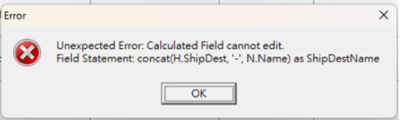
- #43110 - Below error found when batch edit 'Port' and 'Destination' in sales order directory. Already fixed.
- #43113 - 'Import' function did not work in main menu – File. Already fixed.
- #43200 - In Admindsk – Profile settings, 'Invisible' function did not work for some fields. Already fixed.
- #43247 - Error 'Item ot found' found when oepn multiple records, the close any one of them. Already fixed.
- #43282 - Enhance 'Payable Invoice' directory UI, remove currency sign and fix the missing translation of some fields.

Release 5.0.5.11 (2026/03/29)
- Change all syslmdate field from float to datetime
Release 5.0.5.10 (2026/01/14)
Minor Modification
- #43761 - Enhance directory download data method in order to solve 'Out of Memory' problem.
- #43546 - Add 'Clear row' button to Lot Management Reserve interface, Can clear the whole row reserved data quickly if there are many job allocation records.
Bugs Fixed
- #38945- Error 'Invalid class typecast' found when switch warehouse in Lot Management directory, Already fixed.
- #41645 - Quantity shown on Sample Order directory, but no quantity found when open record. It is due to quantity is inputted but without input color and size. Already fixed.
- #42160 - Cannot delete records in Warehouse Access Control. Already fixed.
- #43681 - When input purchase order Receive transaction, error 'Unexpected error, control edRemark is not expected' found. Already fixed.
Release 5.0.5.9 (2026/01/13)
Minor Modification
- #41424 - Add extended fields in download column when copy shipping document from other document.
- #41769 - In purchase order 'Request' and Material Requirement directory, default 'Outstanding (max dtl)' filter criteria to '>0' and 'Cover' to 'No'
- #43095 - Enhance Size Specification input method 1. Add column 'Row' to make it easier to double check the content 2. After input 'unit' & format' in one row, it will default to other rows. Also will default to other rows when save record. When change one row 'unit' or 'format', it will automatic change other rows 3. When copy size specification from sample order/sales order, show both English and Chinese measurement points content and allow select multiple records to be copied
- #43098 - Enhance edit sketch function 1. Add 'Zoom In' and 'Zoom Out' functions 2. Allow select the newly added sketch position instead of default adding to the end
- #43100 - Add 'Grading' function for material unit consumption per garment sizes. After grading, can use 'Formula' function to add consumption unit.
- #43171 - In sales order BOM shipment details, add display order quantity per each shipments
- #43236 - In Move Voucher, default 'Warehouse' to Required field
- #43285 - Allow select ALL or select multiple sketches to be deleted
- #43286 - Allow copy existing BOM materials, can select multiple materials to be copied
- #43287 - In BOM material directory, if unit consumption is per garment sizes, will show Minimum and Maximum unit consumption
- #43289 - When input material color in BOM, allow select existing colorway codes
Bugs Fixed
- #38957 - No translation for error message when run jos.exe for multiple times. Already fixed.
- #39419 - No translation for Accounting Module error messages. Already fixed.
- #39424 - 'Invisible' function is not working for some master files in System Foundation. Already fixed.
- #40870 - Error found when delete distribution accounts in Accounting - Journal Master. Already fixed.
- #41222 - In Order Milestone module, when export milestone checkpoints on directory to excel file, the row display sequences are changed. Already fixed.
- #41329 - In sales order directory, 'Manufacturer (Work Order)' shound not include 'Cancelled' sub-contracting orders. Already fixed.
- #42537 - After changing the material sizes sequence in Purchase Order, the changed sequence will be lost after input another material. Already fixed.
- #43094 - 'Sample order' icon is lost in Material Requirement directory. Already fixed.
Release 5.0.5.4 (2025/09/11)
Minor Modification
- #38638 - Enhance error found when search two years purchase orders records by program code
- #41845 - Disable upload tailor-made format/report function in AdmindskUnordered List Item
Bugs Fixed
- #41511 - When print standard format, some buttons are hidden and need manually widen the display. Already fixed.
- #41811 - Login jos and admindsk at the same time. When exit either one program, error 'Login token lost’is found. Already fixed.
- #29616 - Style color extended fields are incorrectly displayed. Already fixed.
- #41776 - When save purchase order receiving transactions, error 'TBaseNdo.Refresh: Improper call, document not yet saved!' is found. Already fixed.
- #41598 - When budget sheet material purchase unit and price table unit are of different unit type, budget sheet 'Value' is wrongly calculated. Already fixed.
- #41199 - If sample order material purchase unit and price unit are of different unit type, when copy to budget sheet, factor is wrong. Already fixed.
- #41757 - Cannot correctly move checkpoints up and down in Order Milestone master. Already fixed.
- #41783 - When open prodution note record, can edit extended fields, but cannot batch edit on directory. Error 'no right to edit record' is found. Already fixed.
en/jos_whatsnew.1787713402.txt.gzip · Last modified: by administrator